Lock Screen calendar apps for iPhone, compared
Listings checked on the US App Store, and Apple’s widget against the descriptions in iOS 18.0 · Updated
Calpaper makes this page. Everything about the other apps comes from their US App Store listings, linked below, read on 3 November 2026. We didn’t install or test them. Where another app fits better than ours, we say so. To correct a fact, write to calpaper@danielgh.info.
Short answer
Apple’s Calendar widget shows your next event, with nothing to install. To see the whole day, apps draw it into your wallpaper, and they change it each morning through Apple’s Shortcuts. The apps differ in whether they add widgets, how you pay, their languages and the iOS they need.
At a glance
Six apps that put today’s calendar on the Lock Screen, beside the widget built into iOS, in alphabetical order, ours among them. All six are free to download; what you can pay for is in the last column.
| App | On the Lock Screen | How you pay |
|---|---|---|
| Apple’s Calendar widget | A widget with your next event | Built into iOS |
| AnySchedule | A wallpaper, plus widgets and a Live Activity | Subscription or one-time |
| Calendarly | A wallpaper, plus widgets and Live Activities | Subscription or one-time |
| Calpaper | A wallpaper | One purchase, no subscription |
| Ink | A wallpaper | Subscription (weekly or yearly) or one-time |
| LockDay | A wallpaper, plus widgets | Subscription or one-time |
| LockScreen Calendar Maker | A wallpaper | Subscription or one-time |
Prices differ by country, so we don’t list them; each listing has its own. “A wallpaper” means the listing describes no widget; it doesn’t mean the app can’t.
A widget or a wallpaper
A widget sits in the small space under the clock, and iOS keeps it current. A wallpaper can fill the screen with the day, but it’s a picture: it changes only when a shortcut runs or you update it from the app.
The two go together. Apple’s widget can show the next meeting over any of these wallpapers. If the next event is all you need, the widget alone may be enough; the Outlook guide shows how to add it.
Each app, from its listing
Quotes are the listing’s own words. A dash means the listing doesn’t say.
Apple’s Calendar widget
| Shows | Your next event. iOS calls the widget Up Next: “Track your next upcoming event.” |
|---|---|
| Changes | Kept current by iOS |
| Calendars | The iPhone’s Calendar, with any account added in Settings |
| Setup | Touch and hold the Lock Screen, tap Customize, then Add Widgets (Apple’s steps) |
| How you pay | Built into iOS |
The description is from iOS 18.0’s own strings. We haven’t checked how many events it shows on iOS 26 or 27, or whether it shows all-day events.
AnySchedule
| Shows | “today’s events, to-dos, and habits as your Lock Screen wallpaper” |
|---|---|
| Changes | “With time-based profiles, switch wallpapers automatically”; how isn’t said |
| Widgets | Home Screen widgets and a Live Activity |
| Calendars | Apple Calendar, Google Calendar and Reminders |
| Also | Shared calendars for family or friends, habits, and AI that adds events from a line of text or a photo |
| How you pay | Monthly or yearly subscription, or lifetime |
| Languages | 8 |
| Needs | iOS 26.0 or later |
| Privacy label | Data Used to Track You · Data Not Linked to You |
| Read | Version 20261102001, on 3 November 2026 · App Store |
Calendarly
| Shows | “events, shifts, reminders, tasks, notes and countdowns”; “Free layouts show your whole day” |
|---|---|
| Changes | “refreshes them every morning”; “Shortcuts is only needed for automatic updates. You can update the wallpaper by hand at any time.” |
| Widgets | Home Screen and Lock Screen widgets, and Live Activities; its listing says all are free |
| Calendars | The iPhone’s calendars and reminder lists, and Todoist if you connect it |
| How you pay | Monthly or yearly subscription, or lifetime |
| Languages | 23 |
| Needs | iOS 16.6 or later |
| Privacy label | Data Not Linked to You |
| Read | Version 1.5.4, on 3 November 2026 · App Store |
Calpaper (ours)
| Shows | Today’s events, your open reminders, a note or a list, countdowns and days since, and this month or this week |
|---|---|
| Changes | Each morning, from a Shortcuts automation at the time you set, and whenever you tap Update |
| Widgets | None |
| Calendars | The calendars on the iPhone (iCloud, Google, Outlook) and Apple’s Reminders |
| Also | Saved designs to switch between, tomorrow’s events once today’s are done, seven text sizes, and with Calpaper Pro today’s and tomorrow’s events side by side |
| How you pay | Free; Calpaper Pro is one purchase, never a subscription |
| Languages | 11 |
| Needs | iOS 18.0 or later |
| Privacy label | Data Not Linked to You |
| Read | Version 1.9, on 12 November 2026 · App Store |
Ink
| Shows | “a calendar, agenda, or to-do list over your Lock Screen” |
|---|---|
| Changes | — |
| Widgets | — |
| Calendars | Google Calendar and Apple Calendar, reminders and tasks |
| Also | Create, edit and remove events in the app, with alerts before they start |
| How you pay | Weekly or yearly subscription, or lifetime |
| Languages | 18 |
| Needs | iOS 17.0 or later |
| Privacy label | Data Used to Track You · Data Linked to You · Data Not Linked to You |
| Read | Version 1.2.26, on 3 November 2026 · App Store |
LockDay
| Shows | “Your whole day”: to-dos, calendar and notes, with a “week strip, month view and today’s timeline” |
|---|---|
| Changes | “A quick one-time Shortcuts setup keeps it fresh.” |
| Widgets | Home Screen and Lock Screen widgets |
| Calendars | “events from your iPhone calendars” |
| Also | Tasks sorted by importance and urgency in a four-box matrix, and a pinned note or checklist |
| How you pay | Monthly or yearly subscription, or lifetime |
| Languages | 32 |
| Needs | iOS 17.0 or later |
| Privacy label | Data Not Linked to You |
| Read | Version 2.4.0, on 3 November 2026 · App Store |
LockScreen Calendar Maker
| Shows | “your monthly or yearly schedule”, in styles from an agenda (today, the week, two weeks, the month) to a full year, a lunar calendar, life progress and a priority matrix |
|---|---|
| Changes | “Use our pre-built iOS Shortcut to automatically update your Lock Screen wallpaper every morning” |
| Widgets | — |
| Calendars | Apple, Google and Outlook calendars, and Apple’s Reminders |
| Also | Add, edit and delete events in the app |
| How you pay | Annual subscription, or lifetime |
| Languages | 14 |
| Needs | iOS 17.0 or later |
| Privacy label | Data Not Collected |
| Read | Version 2.6.3, on 3 November 2026 · App Store |
When another app fits better
- Apple’s widget, if your next event is enough. There’s nothing to install or set up, iOS keeps it current, and it sits fine beside any wallpaper app.
- AnySchedule, if a family or a group shares one calendar and wants it on everyone’s Lock Screen. It needs iOS 26.
- Calendarly, if you want widgets and Live Activities from the same app as the wallpaper, work shifts or use Todoist, your iPhone is on iOS 16.6 or 17, or you need one of its 23 languages. Its listing says its free layouts show the whole day.
- Ink, if you want to create and edit events in the same app, or need Arabic, Indonesian, Malay, Thai or Vietnamese.
- LockDay, if your day is mostly tasks sorted by importance and urgency, with a pinned note or checklist and widgets, or you need one of its 32 languages.
- LockScreen Calendar Maker, if you want the full year or a lunar calendar on the wallpaper, or an app whose privacy label reads Data Not Collected.
- Calpaper, if you want the day as the wallpaper itself, with your reminders, a note or a list and countdowns, paid for once if at all, and you don’t need a widget.
What Calpaper can’t do
- It isn’t live. The wallpaper is a picture drawn when your automation runs, at the time you set (the setup suggests 6:00), and whenever you tap Update.
- It needs a few minutes in Shortcuts, once: 5 steps on iOS 27, 10 on iOS 18–26. It needs a Photos wallpaper of its own, and Always Allow when Shortcuts asks.
- It needs iOS 18 or later. Calendarly runs from iOS 16.6, and Ink, LockDay and LockScreen Calendar Maker from iOS 17.0.
- No widgets and no Live Activities.
- 11 languages, against 14 to 32 for four of the others here (AnySchedule has 8).
- A busy day ends in “+N more”: the events that don’t fit beside the other blocks.
- Free and Pro. Today’s events, reminders, a note or a list, the month, one countdown, one days since and one saved design are free. Photo backgrounds, the week, more countdowns, gradients, fonts, emoji and more are Calpaper Pro, one purchase, never a subscription.
What every wallpaper app here shares
- An app can’t set your wallpaper by itself. iOS lets Apple’s Shortcuts do it, with its Set Wallpaper Photo action, so a calendar wallpaper that changes every morning runs through a shortcut.
- Set Wallpaper Photo needs a Photos wallpaper. On a Color or Emoji wallpaper it stops with “Photos cannot be set on the selected wallpaper”.
- On iOS 18–26 the automation must be set to Run Immediately. Otherwise it waits for a tap that nobody gives at 6:00 (the traps).
Questions
Is there a Lock Screen calendar app without a subscription?
Of the apps here, Calpaper lists one purchase and no subscription. Each of the others lists a subscription and a one-time option. Apple’s widget is built in.
Which one updates during the day?
Apple’s widget, which iOS keeps current. Calendarly, AnySchedule and LockDay also list widgets, and Calendarly and AnySchedule list Live Activities; their listings don’t say how often those change. A wallpaper changes only when a shortcut runs or you update it, and the shortcut can run more often: how to keep a calendar wallpaper up to date during the day.
Do I need the Shortcuts app?
For a wallpaper that changes by itself, yes: iOS doesn’t let apps set the wallpaper on their own. Shortcuts comes with the iPhone.
Will my Google or Outlook calendar show?
In any app that reads the iPhone’s Calendar, once the account is added to the iPhone (how, for Outlook). Which calendars each listing names is in its table.
What’s the best app to put my calendar on my iPhone Lock Screen?
It depends on what you want. The next event: Apple’s widget. Widgets as well as a wallpaper: Calendarly, AnySchedule or LockDay. A shared family calendar: AnySchedule. The year or a lunar calendar: LockScreen Calendar Maker. The day as the wallpaper with reminders and a note, without a subscription: Calpaper.
Is my calendar private?
Each app’s privacy label, as its developer declared it to Apple, is in its table. Calpaper has no account and no servers: it reads your calendar and draws the wallpaper on the iPhone.
How we checked
- We read each app’s US App Store listing on 3 November 2026, and give the version we read. Calpaper’s we read again on 12 November 2026, for version 1.9.
- “—” means the listing doesn’t say, not that the app can’t.
- We didn’t install or test the other apps.
- Prices differ by country, so we name none.
- An app is here if it puts today’s calendar on the Lock Screen, is in the US App Store’s top 10 for a Lock Screen calendar search or is often searched for by name, has at least 30 US ratings, and was updated in the last 90 days.
- We read the listings again every month. Corrections: calpaper@danielgh.info.
- App names belong to their owners. Calpaper isn’t affiliated with any of them.
Your whole day as the wallpaper
Calpaper is an iPhone app that draws today’s events, reminders and a note into your Lock Screen wallpaper every morning, with the month, the week or a countdown if you want them.
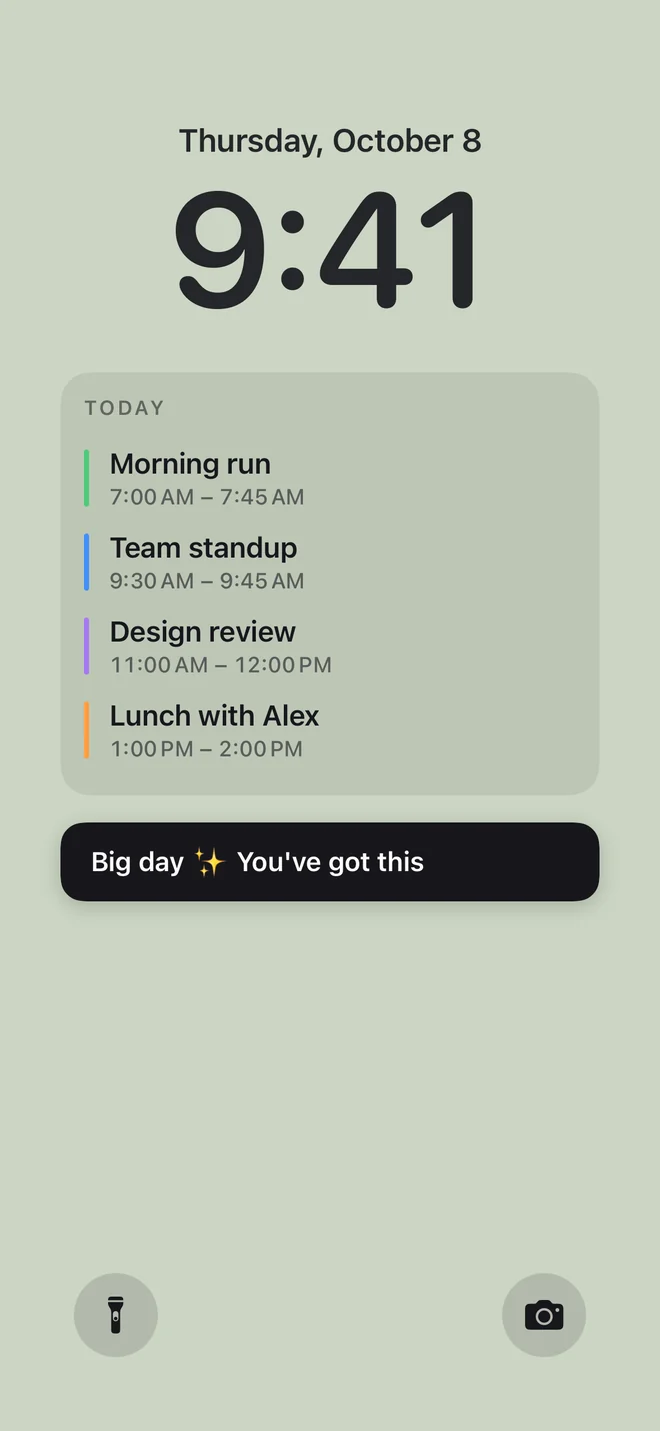
Before you download:
- It needs an iPhone with iOS 18 or later.
- Setup uses Apple’s Shortcuts app, once, for a few minutes: 5 steps on iOS 27, 10 on iOS 18–26 (see them for your version).
- You give Calpaper a Photos wallpaper of its own, any photo: Shortcuts can’t put a picture on a Color or Emoji wallpaper.
- It’s a picture redrawn each morning and whenever you tap Update, not a live widget.
- Events, reminders, a note, the month and one countdown are free. Photo backgrounds and the extra styles are Calpaper Pro, one purchase, never a subscription.