
Reminders not showing on your iPhone Lock Screen? What iOS shows, and the fixes
Widget checked on the iOS 27.0 simulator; Apple’s labels checked against iOS 18.0, 26.5 and 27.0’s own strings; alerts from Apple’s support pages · Updated
Short answer
iOS shows reminders on the Lock Screen two ways. Alerts come only for reminders with a date, time or place, and only if Reminders may show alerts there. The Reminders widget shows one list, and its Today list skips reminders with no date. A wallpaper can list undated ones too.
Two different things go by this question: the alert that should appear when a reminder is due, and the Reminders widget under the clock. They go wrong for different reasons, so this page takes them one at a time. On 24 November 2026 we put the widget on the Lock Screen of the iOS 27.0 simulator with five reminders: one due today at a time, one due today with no time, one overdue, one with no date and one due tomorrow. The labels in bold are Apple’s, read from iOS 18.0, 26.5 and 27.0’s own strings, in English.
Which reminders reach the Lock Screen
The widget set to Today, as it behaved on the iOS 27.0 simulator, beside what a Calpaper wallpaper draws (version 1.10.2):
| The reminder | Reminders widget, Today | Calpaper wallpaper |
|---|---|---|
| Due today at a time | Shown | Shown first, in time order |
| Due today, no time | Shown | Shown after the timed ones |
| Overdue | Shown, at the top in our test | Shown after today’s, the most recent first |
| No date | Not shown: with only an undated reminder left, the widget said “No Reminders” | Shown after the overdue ones, by name |
| Due on a later day | Not shown: Apple defines Today as “Items scheduled for today and overdue items” | Shown last, the soonest first |
| Ticked off | Gone at once | Gone at the next run of your shortcut, or when you tap Update |
Alerts follow their own rules, in the next section.
If the alert never comes
Work down this list. The fixes are Apple’s, from the pages under Sources.
- Does the reminder have something to remind you by? Apple lists the ways: “You can be reminded on a certain date, at a specific time or location, or when you’re texting someone in Messages.” A reminder with none of these sits in its list with nothing to alert you by. Give it a date and time.
- A date but no time? Then it alerts at the Today Notification time, in Settings › Apps › Reminders: “Set a time to see notifications for all-day reminders that have been assigned a date without a time.” Apple’s default is 9:00 AM.
- Are Reminders’ notifications on, for the Lock Screen? In Settings › Apps › Reminders › Notifications, turn on Allow Notifications, then under Alerts make sure Lock Screen is chosen.
- Waiting for a summary? If Reminders is in your Scheduled Summary, its alerts wait for the summary. In the same place, under Notification Delivery, choose Immediate Delivery.
- Hidden behind a number? With Display As set to Count in Settings › Notifications, the Lock Screen “Shows the total number of notifications at the bottom of the screen.” Tap the number, or choose Stack or List.
- There, but with no words? With Show Previews set to When Unlocked, the Lock Screen hides what the reminder says. Apple: “To show the contents of notifications on the Lock Screen without unlocking your device, go to Settings, tap Notifications. Tap Show Previews, then select Always.”
- Held back by a Focus? A Focus silences apps it doesn’t allow. In that Focus’s settings, tap Allow Notifications From and add Reminders. Apple doesn’t say whether Reminders’ alerts count as Time Sensitive Notifications.
- Muted? If you muted Reminders from one of its notifications, Apple’s fix is to “swipe left on the notification in Notification Center, tap Options, then tap Unmute.”
- Going to your Apple Watch instead? In Apple’s words: “If your iPhone is locked or asleep, you get notifications on your Apple Watch, unless your Apple Watch is locked.”
- Not on this iPhone at all? If a reminder made on another device isn’t in the Reminders app here, it’s a sync problem. Apple’s checks for iCloud: the same Apple Account on every device, with Reminders turned on in iCloud, and the date and time set correctly.
If the widget is blank or shows the wrong ones
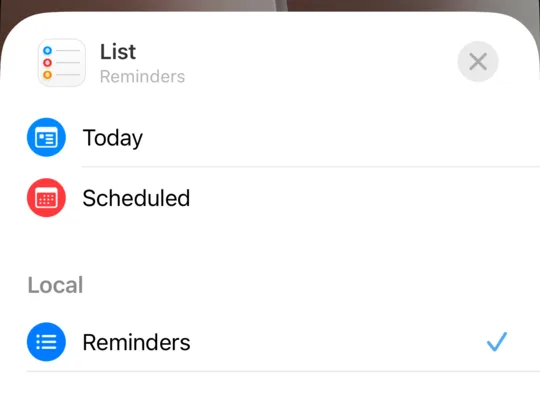
To add it, in Apple’s steps: touch and hold the Lock Screen, tap Customize, tap Add Widgets, then tap or drag the widget you want and tap Done. On the iOS 27.0 simulator, the Lock Screen offered one Reminders widget, List: “Get quick access to one of your reminder lists.” It showed two reminders at a time.
- It shows one list. While customizing the Lock Screen, tap the widget to choose it: Today, Scheduled, or one of your own lists. On the simulator it started on our default list, Reminders, so it showed reminders from that list, not only what was due. For the Home Screen widget, Apple’s step is “touch and hold the widget, tap Edit Widget, then choose a list.”
- Today skips reminders with no date. With only an undated reminder left open, the widget said Today, “No Reminders”. Give the reminder a date, or set the widget to the list it’s in.
- Overdue ones come first. In our test, Today showed the overdue reminder above today’s, so with two lines an old reminder can push today’s off. Tick it off, or change its date.
- You can tick reminders off from it. Tapping a reminder’s circle ticked it off, and the next one moved up. Apple: “With the Reminders widget, you can complete items from the iPhone Home Screen or Lock Screen.” Our simulator had no passcode, so we didn’t see whether a locked iPhone asks you to unlock first.
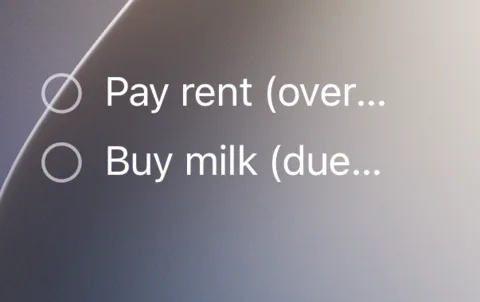 Overdue first
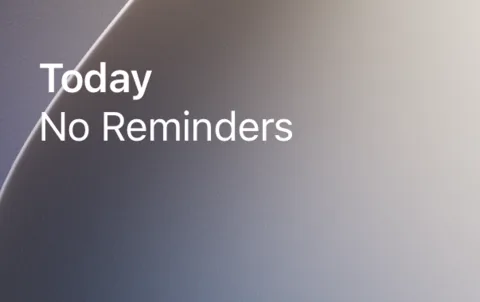 Only an undated one left
Reminders in the Calendar widget
The Calendar app can show reminders that have a date, as Scheduled Reminders; on iOS 18 its What’s New screen says “View and create scheduled reminders in calendar.” So a reminder can turn up in the Calendar widget too: on the iOS 27.0 simulator, its Next Event widget showed a reminder due at 10:54 when no event came before it. More in iPhone Calendar widget not showing events?
Every open reminder, on the wallpaper
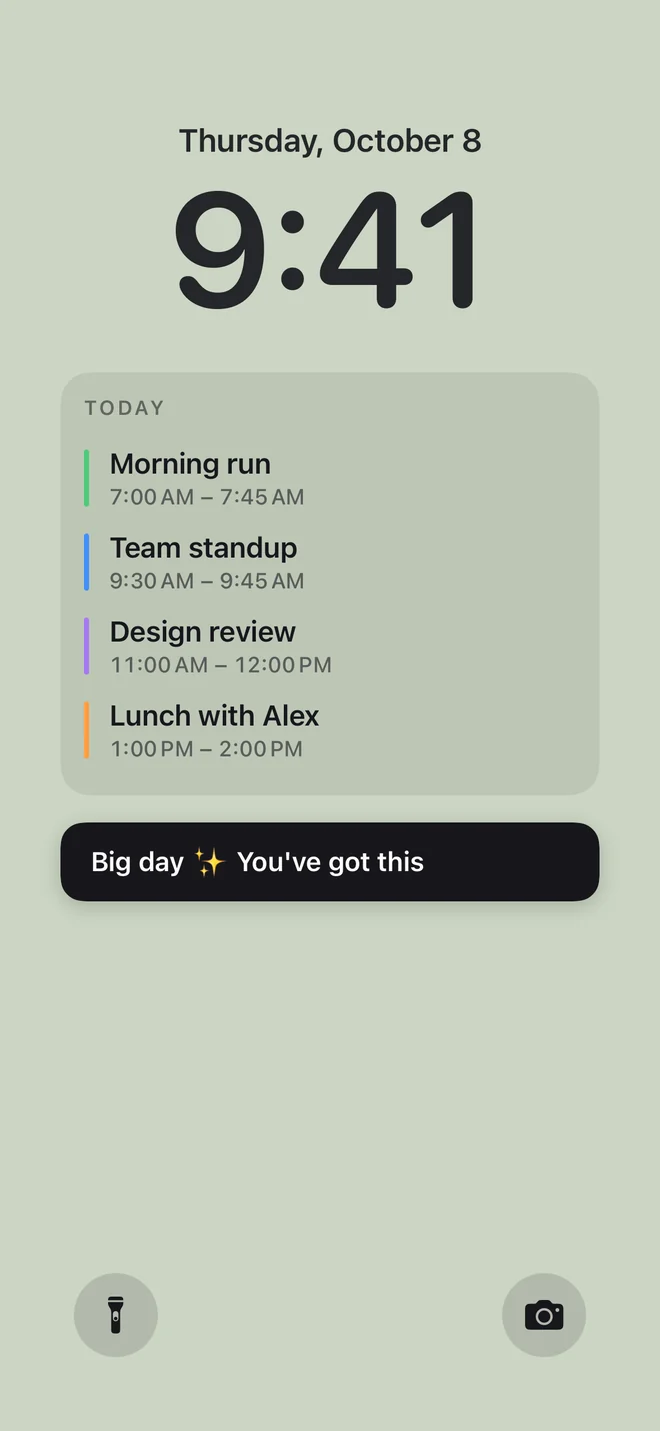
A widget has two lines; a wallpaper has the screen under the clock. Calpaper for iPhone draws your open reminders from the Reminders app into the Lock Screen wallpaper, beside today’s events if you want them (how it works). In version 1.10.2:
- The order: due today first (those with a time in time order, then the rest), then overdue (the most recent first), then those with no date (by name), then those due on a later day (the soonest first, from 1.10.1). When they don’t all fit, the last line says “+N more”.
- Which lists: Content › Reminders › Lists. Due dates adds when each dated one is due, and List colors tints each one’s ring like its list.
- Ticked off shows at the next drawing. The wallpaper is a picture. Tick a reminder off in Reminders and it leaves the wallpaper at the next run of your shortcut, or when you tap Update. The app’s status pill says Update once your reminders have changed.
- It needs access. If Reminders access is off, Content › Reminders says so, with Open Settings.
- Events can come along. Beside the reminders, the wallpaper can show today’s events from every calendar on the iPhone, Google Calendar’s too once its account is added (Google Calendar, step by step). An account on Fetch can be hours behind (Push and Fetch).
The widget’s name in your language
If your iPhone isn’t in English, the widget gallery shows these words under Reminders. They’re the same on iOS 18.0, 26.5 and 27.0.
| Language | Widget | iOS’s description |
|---|---|---|
| English | List | Get quick access to one of your reminder lists. |
| Spanish (Spain, Latin America) | Lista | Obtén acceso rápido a una de tus listas de recordatorios. |
| Portuguese (Brazil) | Lista | Acesse rapidamente uma das suas listas de lembretes. |
| German | Liste | Schneller Zugriff auf eine deiner Erinnerungslisten. |
| French | Liste | Accédez rapidement à l’une de vos listes de rappels. |
| Italian | Elenco | Accedi rapidamente a uno dei tuoi elenchi di promemoria. |
| Japanese | リスト | リマインダーのリストに素早くアクセスできます。 |
| Korean | 목록 | 미리 알림 목록 중 하나에 빠르게 접근할 수 있습니다. |
| Chinese (Taiwan) | 列表 | 快速取用你的提醒事項列表。 |
| Chinese (Hong Kong) | 列表 | 快速取用你的其中一個提醒事項列表。 |
| Chinese (Simplified) | 列表 | 快速访问其中一个提醒事项列表。 |
| Turkish | Liste | Anımsatıcı listelerinizden birine hızlı erişim sağlar. |
What it can’t do
- The widget shows one list, two reminders at a time, in the size we tested.
- Today never lists reminders with no date, and neither does it list those due on a later day: Apple defines it as today’s and overdue items.
- A reminder with no date, time or place has nothing to alert you by.
- A wallpaper can’t alert you or be ticked. It’s a picture, redrawn when your shortcut runs and when you tap Update. Keep Reminders’ alerts for the moment something is due.
- We walked iOS 27.0 only. The iOS 18.0 and 26.5 simulators didn’t take our taps, so for those versions this page relies on their strings (the same widget and description) and on Apple’s pages, not on what we saw.
Questions
Why are my reminders not showing on my Lock Screen?
If it’s the alert: the reminder needs a date, time or place, and Reminders needs Allow Notifications with Lock Screen chosen (every check). If it’s the widget: it shows one list, and its Today list skips reminders with no date (the widget).
Why doesn’t my reminder show in the Today widget?
Today holds reminders due today and overdue ones. A reminder with no date, or one due on a later day, isn’t in it. With only an undated reminder open, the widget said “No Reminders”.
Why did my all-day reminder alert at 9 AM?
A reminder with a date and no time alerts at the Today Notification time in Settings › Apps › Reminders. Apple’s default is 9:00 AM; change it there, or give the reminder a time.
Can I tick off a reminder from the Lock Screen?
From the widget, yes: on the iOS 27.0 simulator, tapping a reminder’s circle ticked it off. Apple says you can “complete items from the iPhone Home Screen or Lock Screen.”
Why do reminder alerts come to my Apple Watch and not my iPhone?
That’s how iOS sends them: “If your iPhone is locked or asleep, you get notifications on your Apple Watch, unless your Apple Watch is locked.”
Does a Calpaper wallpaper remind me when something is due?
No. It shows your open reminders in a list on the wallpaper. Alerts still come from the Reminders app, so keep its notifications on.
Your reminders and your day, before you unlock
Calpaper is an iPhone app that draws your open reminders and today’s events into your Lock Screen wallpaper every morning, undated reminders included, with a note or the month if you want them.

Before you download:
- It needs an iPhone with iOS 18 or later.
- Setup uses Apple’s Shortcuts app, once, for a few minutes: 4 steps on iOS 27, 8 on iOS 18–26 (see them for your version).
- You give Calpaper a Photos wallpaper of its own, any photo: Shortcuts can’t put a picture on a Color or Emoji wallpaper.
- It’s a picture redrawn each morning and whenever you tap Update, not a live widget.
- Events, reminders, a note, the month and one countdown come with the app. Photo backgrounds and the extra styles are part of Calpaper Pro.
Sources
Apple’s pages were read on 24 November 2026. The walk used a new iPhone 17 Pro simulator on iOS 27.0, set to English, with sample reminders made for it, and was deleted afterwards.
- iPhone User Guide, Add details to items in Reminders on iPhone: the ways to be reminded.
- iPhone User Guide, Change your Reminders settings on iPhone: Today Notification.
- Apple Support, Use Reminders on your iPhone, iPad, or iPod touch (published 9 October 2026): the 9:00 AM default.
- Apple Support, Turn notifications on or off for a specific app on your iPhone (published 7 April 2026): Allow Notifications.
- iPhone User Guide, Change notification settings on iPhone: Alerts, Notification Delivery, Scheduled Summary.
- Apple Support, Use notifications on your iPhone or iPad (published 14 September 2026): Display As and Show Previews.
- iPhone User Guide, Allow or silence notifications for a Focus on iPhone: Allow Notifications From.
- iPhone User Guide, View and respond to notifications on iPhone: Unmute.
- Apple Support, How to get notifications on your iPhone and Apple Watch (published 15 September 2025).
- Apple Support, If your iCloud Contacts, Calendars, or Reminders won’t sync (published 4 April 2026).
- Apple Support, How to add and edit widgets on your iPhone (published 14 September 2026).
- iPhone User Guide, Complete items in Reminders on iPhone: the widget, Edit Widget.
- iPhone User Guide, Use Smart Lists in Reminders on iPhone: what Today holds.